
Hvad skal en revisionslog foer og efter en arbejdsrettelse gemme?
When a work record is edited, the system should save the values before and after the change, the person who made it, the time, the reason, the approval status, and the effect on the available amount. This journal lets the employer explain differences, approve the right data version, and reconcile the record with transactions and final payroll.
Why is keeping only the final value not enough?
If a work record started at eight hours and was later changed to six, keeping only “six hours” removes the context.
When a worker asks a question, the employer cannot explain the old value, who changed it, when it changed, why it changed, which version the earlier approver saw, how much the available amount changed, or whether a transaction existed before the edit.
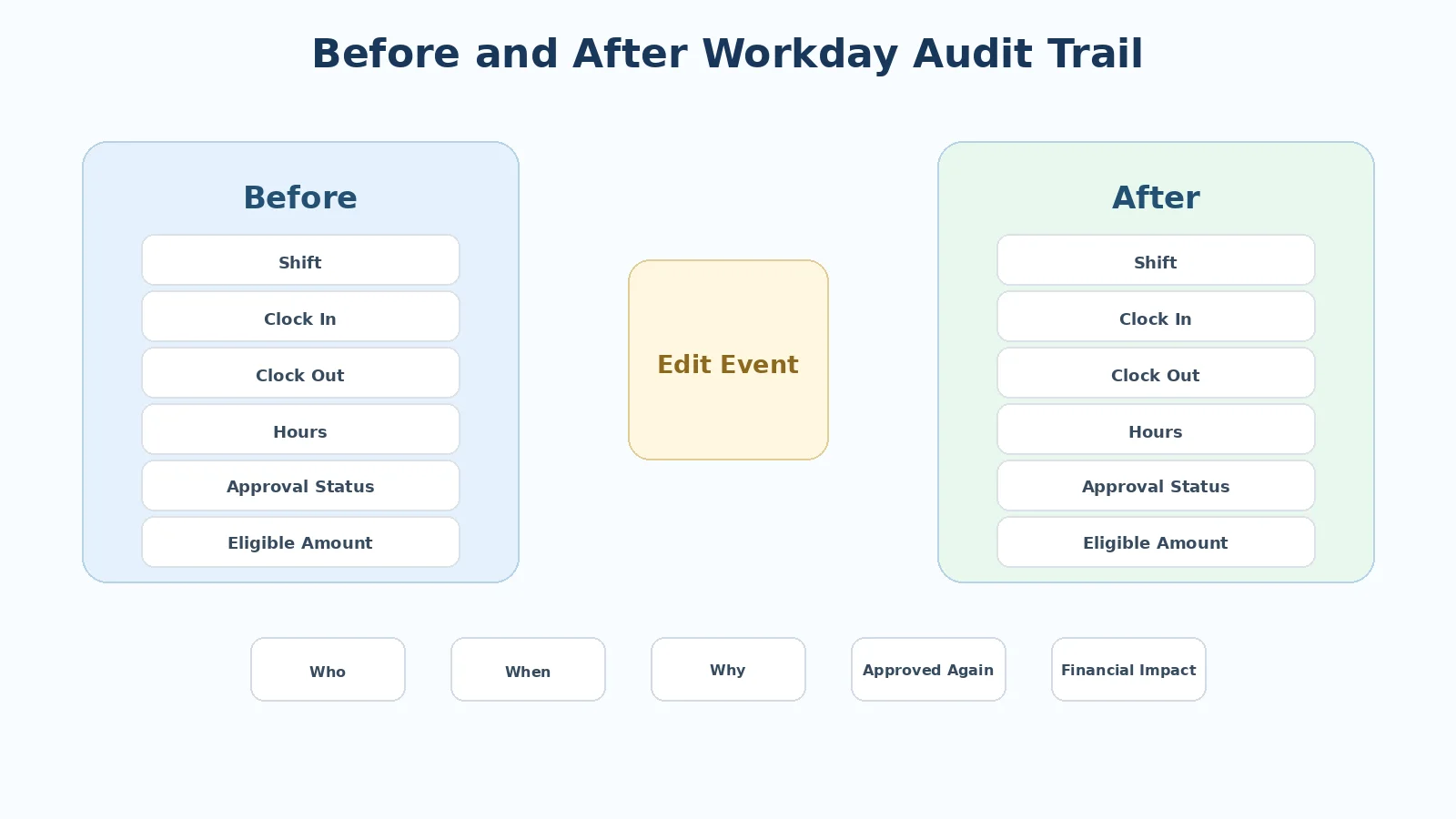
An audit trail turns a data change into a verifiable event.
Minimum fields to save
An edited work record should contain at least the following groups.
1. Record identity keys
Include the worker ID, client or workplace, workday, shift, record ID, and pay period. The keys must be stable enough to link the record to transactions and payroll.
2. Data before the edit
Examples include clock-in, clock-out, total hours, shift, overtime, work status, applied unit, and approval status.
3. Data after the edit
Save the exact fields that changed so they can be compared with the old values.
4. Who performed the change
Record the account, role, permission scope, and action source.
5. When the change occurred
Save a precise time so it can be compared with transaction time, approval time, synchronization time, and period-lock time.
6. Reason for the edit
Do not rely only on free text. Reason codes can include missing clock-in, missing clock-out, wrong shift, overtime not recorded, duplicate data, wrong workplace, or an adjustment confirmed by the client. Add a note when needed.
Save both the editor and the re-approver
The person who edits data is not necessarily authorized to approve the new version.
If one person can edit and re-approve every case, control risk increases.
The audit trail should therefore separate:
| Role | What to save |
|---|---|
| Edit requester | Who proposed it |
| Editor | Who changed the data |
| Re-approver | Who confirmed the new version |
| Exception handler | If there is a financial difference |
This separation helps establish responsibility when something goes wrong.
Record financial impact with the change
When work data affects Earned Wage Access, the system needs to show the impact.
For example: before edit eight hours, after edit six hours, lower work value, lower available amount, whether a transaction already exists, and whether a difference is waiting for handling.
An audit trail that records only “eight to six hours” without the money impact is incomplete for Payroll Integrity.
Case with no transaction yet
If work is edited before the worker receives money, the record returns to pending approval, the new version is confirmed, the available amount is recalculated, and the audit trail contains the full before and after values.
This is a relatively simple case.
Case with an existing transaction
If money has already been paid, the old transaction remains, the new work must be approved again, the value is recalculated, any difference enters reconciliation, and the transaction is not deleted merely because work changed.
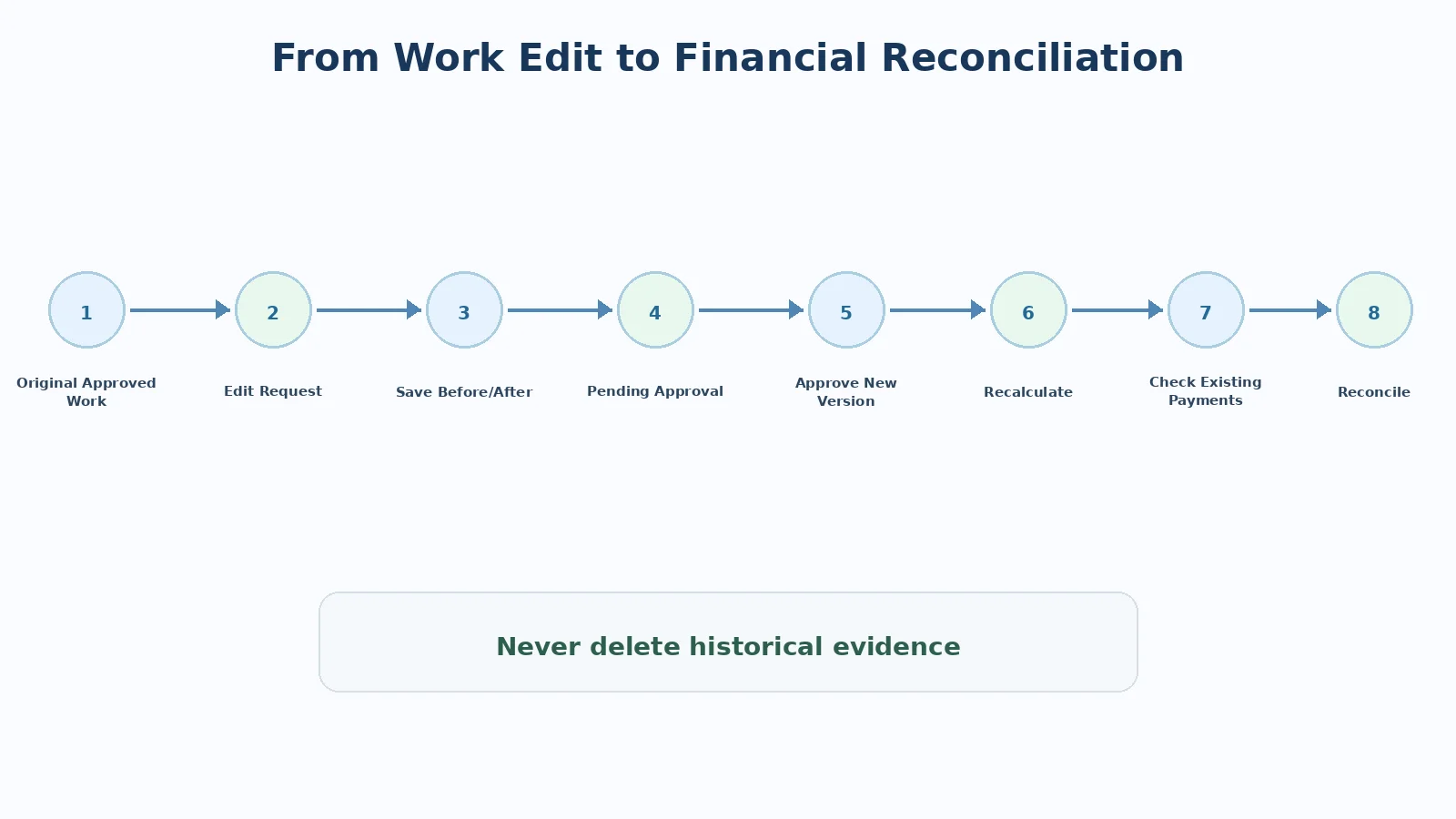
This case shows why the audit trail must connect to the transaction as well as to the work record.
Where should the audit trail be kept?
As a system principle, the audit trail should be held in a controlled data store, protected from ordinary deletion, visible by role, searchable by worker, date, client, and transaction, based on one system time, and backed by immutable records or restricted log editing.
A manual Excel file should not be the only audit source for a process involving money.
What should an audit dashboard support?
Operations should be able to filter work edited after approval, work edited after a transaction, the number of edits on one record, editor, reason, time waiting for re-approval, money difference before and after, and records that remain unresolved.
Records with paid money should receive higher priority.
Can an audit trail reduce complaints?
Yes. When a worker asks why an amount changed, support can check the edited day, old value, new value, re-approver, and impact on the available amount.
Instead of a general explanation, the employer has specific evidence.
How much of the journal should workers see?
Workers do not need every internal detail. The application can show the workday, status, relevant before and after data, reason, update time, and a feedback channel.
Administrative account names and technical logs can remain restricted by role.
Common audit design mistakes
Common mistakes include keeping only the final value, allowing logs to be edited, omitting the reason, omitting the re-approver, failing to link the log to a transaction, using a person name instead of a stable ID, using inconsistent time zones, failing to capture changes from an external source such as Google Sheets, and not warning about an edit after payment.
These mistakes make traceability much harder.
Conclusion
A before-and-after journal is a foundation of Payroll Integrity because it answers what changed, from which value to which value, who did it, why, when, and with what money impact. When the audit trail connects work, transactions, and payroll, the employer can resolve differences with evidence rather than memory or scattered conversations.
Author: Do Huy Le — Tổng Giám Đốc, Nhan Kiet Manpower Supply Co., Ltd.
Earned wage access advice for employers: Hotline 0937.022.655 · Email info@nhankiet.vn · Earned wage access for employers
FAQ
Must every small change be saved?
Save every material business change. Classify severity to avoid overload, but do not omit fields that affect money.
Does an audit trail replace approval?
No. The audit trail records an event; approval controls authority and responsibility.
Can the editor delete the log?
As a control principle, no. The log should be independent of ordinary business actions.
What if data in Google Sheets is edited?
The system should detect the change, save before and after values, and move the relevant record to the status that requires confirmation again.