
EWA for Retail, F&B, and Chain Stores: How to Manage Flexible Shifts?
EWA for Retail, F&B, and Chain Stores: How to Manage Flexible Shifts?
To implement EWA in retail, F&B, or chain stores, businesses need to accurately identify who worked, at which store, during what hours, who approved the shift, and which income is eligible. Rotating shifts, split shifts, shift swaps, multi-location support, overtime, and late data corrections must be managed with stable codes and clear statuses. EWA limits should start from approved time-based wages; sales, commissions, bonuses, tips, and cash collected at the counter should only be considered when there are appropriate policies and reconciliation processes.
> Note: This is a reference business-technical framework, not a payroll formula or legal advice for all businesses. Policies on working hours, breaks, overtime, allowances, commissions, tips, withholdings, limits, and settlements must be confirmed by HR, Payroll, legal, accounting, and the EWA provider according to the actual model.
> Terminology Explanation: EWA (earned wage access) · POS (point of sale system) · HRIS (human resource information system) · payroll (salary calculation) · F&B (food and beverage service) · shift (work shift) · cutoff (period closing point) · pilot (trial implementation) · UAT (user acceptance testing) · KPI (key performance indicator) · tip (gratuity).
Why is EWA in Retail and F&B More Complicated than Simple Timekeeping?
A store may employ full-time, part-time, seasonal staff, shift managers, and employees transferred from other locations. The schedule registered at the beginning of the week may not reflect the actual work schedule. An individual may swap shifts, make up hours, leave early, support peak hours, or work two separate time periods in one day.
Income is also not just one component. Depending on the policy, employees may have:
monthly, daily, or hourly wages;
night shift, meal, position, or store allowances;
approved overtime pay;
sales commissions;
performance, attendance, or quality bonuses;
tips allocated according to regulations;
end-of-period adjustments.
If EWA uses projected schedules, raw timekeeping, or POS revenue as earned income, the limit may be higher than reality. Conversely, if approval data is delayed, employees who have worked may not see their limit. Therefore, the core issue is not just fast money transfer, but creating an eligible, explainable, and reconcilable income record.
1. EWA Data Mapping for Chain Stores
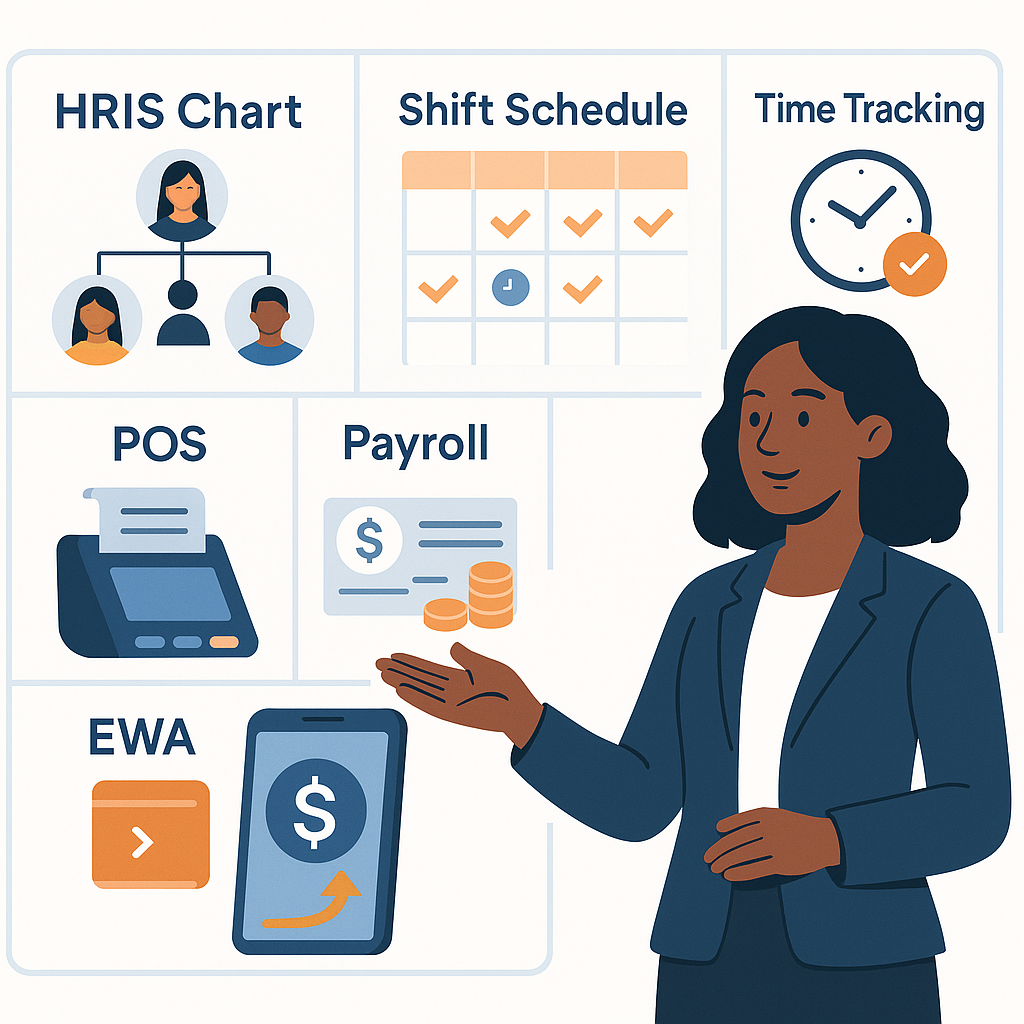
Role of Each System
2. Group Employees Before Designing Policies
(Other industries: see EWA for Multi-Shift Manufacturing and EWA for Logistics, Warehousing, and Delivery.)
Full-Time Shift Employees
Usually have relatively stable schedules but still experience shift swaps, overtime, leave, support, or overnight work. If on a monthly salary, businesses still need rules to convert earned income to calculate limits.
Part-Time Employees
Actual hours may change daily. For this group, registered schedules are insufficient to create limits; completed and approved shift data is more important.
Seasonal Employees
Often increase rapidly during holidays, grand openings, or sales campaigns. Need to control start/end dates, contract type, payment records, and EWA participation conditions.
Sales Employees with Commissions
Commissions may depend on successful orders, payments, returns, personal or store targets. Do not assume generated sales are finalized commissions.
Store and Shift Managers
This group has both personal income and participates in approving others' data. Rights to create, edit, and approve must be separated to avoid conflicts of interest.
Each group should be associated with an eligibilitypolicyid and earningpolicyversion. A single policy for the entire chain often does not accurately reflect differences between brands, regions, work forms, and pay methods.
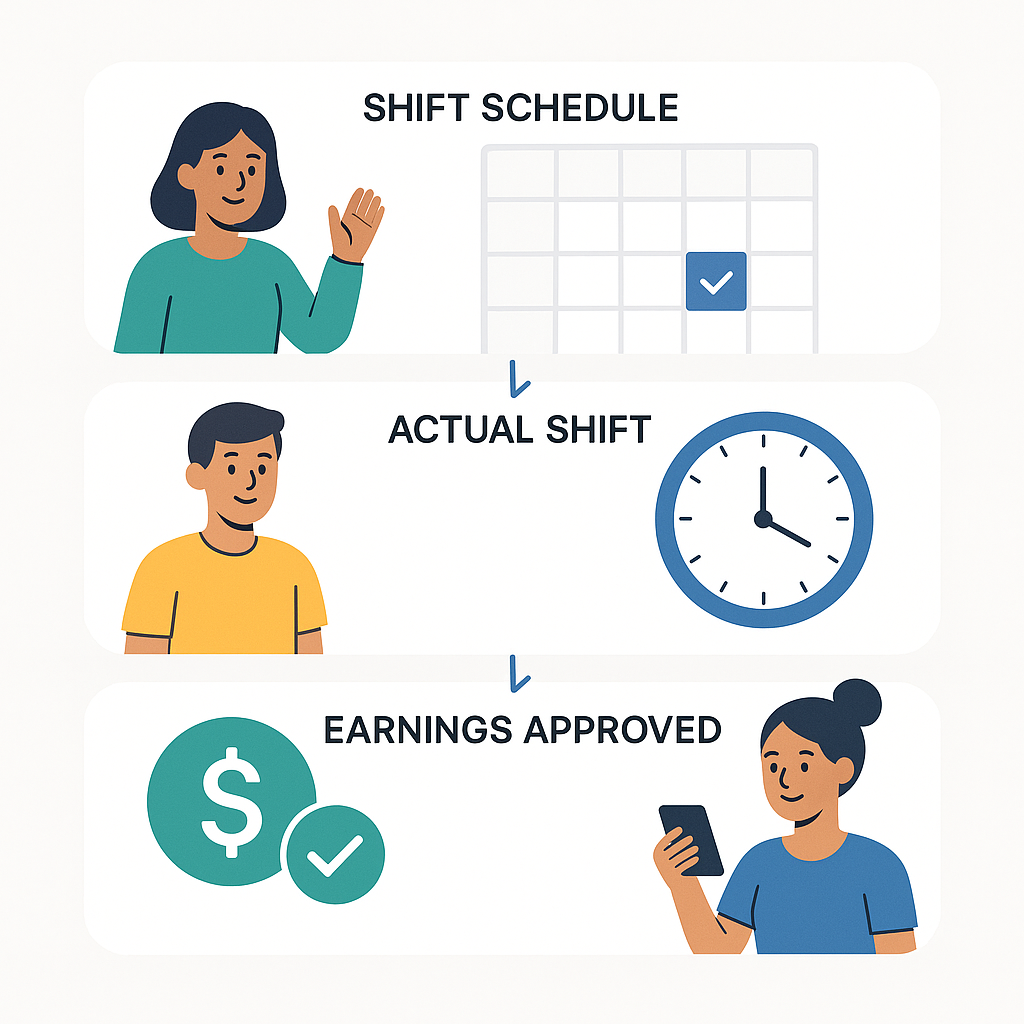
3. Scheduled Shifts, Actual Shifts, and Approved Work Are Three Different Layers
(Background concept: see What is Approved Work?.)
Scheduled Shift
Is the plan: who is expected to work, where, from what time to what time. The schedule serves coordination but does not prove work has occurred.
Actual Shift
Is data after employees check-in/out, possibly with store confirmation. Actual shifts still have exceptions like missing timekeeping, wrong location, device failure, or unupdated shift swaps.
Approved Work
Is the result after applying rules and authorized confirmation. This is the suitable foundational data for considering earned wage calculation.
This principle helps clearly answer employees: “Why do I have a schedule but no limit?” or “Why are the hours on the app different from the projected hours?”.
4. Minimum Shift Data Model
Each shift or work segment should have:
stable
employee_id;employer_idor legal entity paying wages;brandid,regionid,store_id;assignment_id;shiftidandworkdate;projected start/end time;
actual start/end time;
break minutes according to policy;
regularminutes,overtimeminutesif determined;actual role during the shift;
exception status and reason;
approval status;
approver and approval time;
record_versionand update time.
Why is work_date Needed?
A shift from 10 PM to 6 AM the next day involves two calendar days. Systems must agree on which business day the shift belongs to, especially during payroll period transitions. If POS records by transaction day, timekeeping by start day, and payroll by end day, reconciliation will be misaligned.
Why is Data Versioning Needed?
An approved shift may be edited because an employee adds a check-out or a manager confirms a transfer. Without versioning, the system struggles to know which data version the limit was created from.
5. Properly Handling Shift Swaps

Shift swaps typically involve at least three parties: the person giving up the shift, the person taking the shift, and the manager. Simply changing the name on the schedule without saving history complicates timekeeping, payroll, and EWA.
A reference lifecycle:
stateDiagram-v2
    [*] --> Scheduled
    Scheduled --> SwapRequested
    SwapRequested --> SwapApproved
    SwapRequested --> Rejected
    SwapApproved --> Worked
    Worked --> AttendanceApproved
    AttendanceApproved --> PayrollEligible
The system needs to record:
original shift and initially assigned person;
requester and recipient;
request time;
approver;
effective time;
actual timekeeping results;
reason for cancellation or change;
previous/next versions.
EWA is based only on the person who actually worked and approved work. The person named in the original schedule is not credited if the shift has been legitimately transferred to someone else.
6. Split Shifts, Overlapping Shifts, and Working at Two Stores in a Day
Split Shifts
In F&B, a person may work lunch hours, take a break, then return for dinner hours. The system should record two work segments. If using the first check-in and last check-out, long breaks may be mistakenly counted as work time.
Overlapping Shifts
Overlapping shifts can occur due to scheduling errors, shift swaps, or manual entries. The limit engine needs to block overlapping time before calculating income.
Supporting Multiple Stores
An employee may work in the morning at Store A and in the evening at Store B. Need to know:
which legal entity pays wages;
which unit bears the cost;
which rate/role applies;
who approves each work segment;
whether total daily time is valid;
whether data is included in one or multiple payroll periods.
Do not create two separate employee records just because someone works at two stores. Use one employee_id and multiple assignment records with effective dates.
7. Transferring Employees Between Stores and Brands
Transfers can be short-term by shift or long-term by decision. Each case needs clear effectivefrom and effectiveto.
Transfer Within the Same Legal Entity
Usually affects cost unit, store approving work, role, and allowances.
Transfer to a Different Legal Entity
Clarify the employing entity, paying entity, shared data, and settlement method. Do not just change store_id if the responsible unit actually changes.
Transfer to a Different Role
A service employee may support cashier or warehouse roles. If rates/allowances depend on roles, the system must record the actual approved role, not inferred from the default HRIS title.
8. Categorizing Income Before Including in EWA
Businesses should build an “income item catalog” with item codes, formulas, eligibility conditions, effective dates, caps, rounding methods, and approvers. Do not use free-form names like “other allowances” as they are hard to verify and reconcile.
9. POS Revenue Is Not Earned Income
POS records sales activities, not payroll. An invoice may:
be served by multiple people;
be entered under a shift manager account;
be canceled, refunded, or adjusted;
belong to store revenue instead of individuals;
occur before but paid after;
include taxes, delivery fees, or non-commissionable items.
If a business has commissions, a separate rule layer is needed to convert transaction data into eligible commission amounts. This layer must handle person assignment, final status, returns, closing time, and policy version. EWA should not directly calculate commissions from total POS revenue.
10. Tips, Cash at Counter, and Collected Payments Must Be Separated

Tips
Tips may be given directly by customers, paid through POS, or pooled for allocation. Entitlement and determination time depend on company policy. Only when tips are determined, allocated, approved, and part of the EWA policy should they be considered.
Cash at Counter
Cash held by cashiers is the company’s asset/operational cash flow, not evidence of personal income.
Collected Payments from Delivery Platforms
Revenue through platforms, collected cash, and partner settlement are different business flows. Do not automatically offset with EWA transactions without basis and approved processes.
System design should at least separate:
storecashcollected;cashhandoverstatus;tippoolamountand allocation status if applicable;eligibleearningamount;ewatransactionamount;payment_status.
11. Conceptual Formula for Limit Calculation
A reference model:
$$
\text{Eligible Income} = \text{Approved Time-Based Work} + \text{Eligible Allowances} + \text{Finalized Variable Amounts}
$$
$$
\text{Available Limit} = \text{Eligible Income} \times \text{Allowed Rate} - \text{Reserves} - \text{Received/Processing}
$$
This is not a default formula. Components need confirmation according to company policy. The limit engine must also check:
labor relation status;
current store/legal entity;
payroll period and cutoff date;
caps per transaction/day/period if any;
processing transactions;
late work adjustments;
policy version;
risk locks or justified manual locks.
Employees should clearly see how the limit is formed from how many approved hours/work and which items are not yet counted.
12. Decentralized Work Approval: Fast but Needs Control
Large chains often delegate work approval to store or shift managers. This is the closest to operations but can easily lead to discrepancies between locations.
Recommended Mechanisms
approval cutoff by day or after shift;
exception queue instead of direct, untraceable edits;
limit rights by store and effective time;
no self-approval of one’s own work;
second-level approval for major or late adjustments;
dashboard for unapproved stores;
pre/post-change logs for all changes;
alerts for unusual bulk approvals.
Suggested Responsibility Matrix
| Task | Performer | Approver/Controller |
|---|---|---|
| Scheduling | Store Manager/Operations | According to delegation |
| Shift Swap Request | Employee | Shift/Store Manager |
| Work Confirmation | Shift Manager | Store Manager or Payroll for exceptions |
| Post-Cutoff Work Edits | Authorized Person | Independent Control Level |
| Eligible Amount Finalization | Payroll/engine | According to approved policy |
| Transaction Reconciliation | EWA Ops/Payroll/Accounting | Process Owner |
Official RACI must be decided by the business; the table above is a design suggestion.
13. Integration with Scheduling, Timekeeping, POS, and Payroll Software
(Data and architecture requirements: see Integrating EWA with Timekeeping, Payroll, and ERP.)
Identifier Locks
Do not connect using names, phone numbers, or displayed store names. Stable codes are needed:
employee_id;legalentityid;brand_id;store_id;assignment_id;shift_id;payrollperiodid;earning_code;transaction_id.
API or Batch File?
| Integration Method | Suitable For | Control Points |
|---|---|---|
| Near Real-Time API | Shifts, work approval, and continuous status updates | Authentication, idempotency, retry, versioning |
| Webhook | State change events | Signature, resend, out-of-order events |
| Batch File/SFTP | Payroll or scheduled work closing | Batch code, checksum, error lines, duplicate prevention |
| Controlled Manual Entry | Small pilot/legacy systems | Standard template, maker-checker, log, reconciliation |
Out-of-Order Events
A shift swap request may update after timekeeping data, or store devices may sync late. Each event should have an eventid, occurrence time at source, system receipt time, and recordversion. Do not use the rule “the latest record is always correct” if lacking version and business status.
14. Reconciliation by Employee – Store – Day – Payroll Period
(Details: see EWA Transaction Reconciliation with Payroll and Accounting.)
Total chain money may match but still be wrong per employee. EWA needs reconciliation to a low enough level to find the cause.
Six Reconciliation Layers
HRIS and assignment;
shift schedule/timekeeping;
approved work and income items;
EWA limits and transactions;
payment results;
payroll, ERP, and accounting.
Discrepancies to Detect
shift exists but employee has left;
timekeeping at wrong store or outside assignment day;
two overlapping shifts;
approved shift swap but work still with the old person;
work edited after limit creation;
an income item loaded twice;
successful transaction but missing payroll;
successful payment but EWA still shows processing;
refund not updated;
wrong period due to overnight shift;
total matches but wrong person or store.
Each discrepancy needs a case code, severity, owner, resolution deadline, evidence, root cause, and closure approver.
15. Handling Work Edits After Employee Has Received Money
This is a scenario that must be tested before go-live.
Reference flow:
system receives new work version;
compare with version used to create limit;
calculate the difference;
check related transactions;
if not disbursed, update limit or stop request;
if disbursed, create a case for policy-based handling;
transparently notify employee if benefits are affected;
save all pre/post values and handling decisions.
Do not silently delete history or automatically deduct from wages just because data decreases. Handling must follow policy, contract, and applicable regulations; a feedback/complaint mechanism for employees is needed.
16. Risk and Fraud Control Specific to Chain Stores
(Full framework: see Risk Management and Fraud Prevention in EWA.)
Signals to Monitor
many employees timekeeping from the same unusual device;
check-in/out far from store when policy uses location;
shift duration exceeds threshold or overlaps store;
manager bulk adjusts right before cutoff;
shifts created and approved after completion;
unusual sales or commission increases;
one person edits work and approves exceptions;
account change then immediate transaction;
multiple employees using the same receiving account;
transaction count or frequency spikes.
Signals are for warning or verification, not automatic fraud conclusions. Overly tight control without explanation mechanisms may mistakenly block eligible employees.
Segregation of Duties
Do not allow one person to simultaneously edit schedules, work, approve income items, change limits, update receiving accounts, and close reconciliation cases.
17. Protecting Timekeeping, Location, and Transaction Data
(Security framework: see Data Security and Privacy in EWA Deployment.)
Chain deployment may handle identifiable data, work schedules, locations, devices, POS transactions, and receiving accounts. Businesses need to determine:
purpose of each data field;
basis and role of processing parties;
which data is truly needed for EWA;
who can view detailed data;
retention period;
access control, logging, and encryption mechanisms;
process for responding to data subject requests;
handling when ending provider contracts;
incident response procedures.
The Personal Data Protection Law No. 91/2025/QH15 and Decree 356/2025/NĐ-CP both take effect from January 1, 2026. Businesses should review actual data flows with legal and security departments; do not transmit entire invoices, customer-purchased items, or detailed location history to EWA when the purpose only requires approved work.
18. Employee Experience at the Store
Users need short answers to four questions:
How many hours/work have I been approved?
What is the current limit?
How much have I received and what is the transaction status?
If work is incorrect or I haven’t received money, who do I contact?
Support Routing
| Issue | Appropriate Contact |
|---|---|
| Incorrect/missing schedule or work | Store Manager/HR Operations |
| Unupdated shift swap | Shift/Store Manager |
| No limit visible | Payroll/EWA Operations |
| Stuck or refunded transaction | EWA/Payment Support |
| Incorrect payroll settlement | Payroll |
| Suspected account loss | Security/Risk |
Use a single ticket number throughout, with SLA and status, so employees don’t have to repeat the issue to multiple departments. For dispersed workforces, combine in-app guidance, store QR codes, hotline, and management contacts.
19. Pilot KPIs for Retail and F&B
Data
percentage of shifts with valid
employeeid,storeid, and assignment;percentage of work approved by cutoff;
percentage of shift swaps updated before limit calculation;
percentage of overlapping, missing timekeeping, or wrong store shifts;
number of post-approval adjustments;
data freshness;
percentage of automated processing.
Experience and Operations
percentage of eligible employees activated;
percentage of successful transactions;
time to receive money;
abandonment rate during flow;
tickets per 1,000 transactions;
percentage of tickets related to incorrect work;
processing time and reopening rate;
understanding of limits, fees, and settlements.
HR and Finance
number of manual advance requests;
operational cost per user/transaction;
percentage of employees working as scheduled;
absenteeism and turnover by cohort;
value discrepancies after reconciliation;
confirmed fraud;
false alert/block rate.
When assessing impacts on recruitment, absenteeism, or turnover, compare groups/cohorts and control for seasonality, grand openings, wages, bonuses, store management, and region. Do not attribute all before-after changes to EWA.
20. UAT Checklist for Chain Stores

Schedule and Work
[ ] Regular, night, and overnight shifts.
[ ] Split shifts with two time segments.
[ ] Two overlapping shifts.
[ ] Approved and rejected shift swaps.
[ ] Recipient has work, giver not credited.
[ ] Employee works at two stores in a day.
[ ] Missing check-in or check-out.
[ ] Store device network loss, late sync.
[ ] Work edits before and after cutoff.
Income
[ ] Time wages correct rate and version.
[ ] Pending overtime not counted early.
[ ] Allowances by shift/position correct conditions.
[ ] Canceled/returned invoices do not create incorrect commissions.
[ ] Tips and counter cash not mixed into limits.
[ ] Adjustments not double-loaded.
Limits and Transactions
[ ] Only eligible items counted.
[ ] Processing transactions reserved.
[ ] Repeat requests do not disburse twice.
[ ] Timeout creates “unclear” status, not auto-failure.
[ ] Receiving account change verified and controlled time.
[ ] Terminated or temporarily locked employees do not create new transactions.
Payroll and Reconciliation
[ ] Overnight shifts in correct period.
[ ] EWA transactions to correct person, entity, and payroll period.
[ ] Payroll file/API prevents duplicates.
[ ] Refunds processed correctly.
[ ] Traceable from payroll to shift and work version.
[ ] Total matches and individual employee details also match.
21. Pilot Design and Expansion by Store Cluster
(Standard roadmap: see 90-Day EWA Pilot Plan for Businesses.)
Selecting Pilot Sites
Choose clusters with:
clear employee demand;
cooperative store management;
relatively clean shift schedules and timekeeping;
not too many exceptions in pay rules;
sufficient quantity to measure but still supportable;
representative of the intended expansion model.
Do not choose only the “best” store, as results may not reflect the chain’s reality. Also, avoid first go-live during peak holidays or grand openings if the system has not been tested.
Start with Approved Work
Initially use highly certain time-based wages. Commissions, tips, bonuses, and variable amounts are added after source data, rules, and reconciliation prove stable.
Expand by Wave
Group stores with the same:
brand/legal entity;
timekeeping and POS software;
shift, pay, and allowance policies;
management model;
payroll process;
support capability.
Each wave must have UAT, training, delegation, dashboard, support plan, reconciliation, and rollback conditions. Do not consider opening more accounts as successful expansion.
22. Common Mistakes
Using Projected Schedule Instead of Actual Work
Shift swaps, sudden leave, and multi-location support will make limits incorrect.
Using First/Last Check-in/Out for Split Shifts
Long breaks may be counted as work hours.
Using POS Revenue to Infer Income
Revenue is not automatically commissionable and may be canceled/returned.
Mixing Cash at Counter with Wages
These are different cash flows, requiring separate systems and reconciliation.
Slow Work Approval but Promising Real-Time Limits
EWA speed depends on source data speed and quality.
Giving Managers Too Much Authority
One person editing work, approving, and closing discrepancies weakens control.
Expanding from Unmeasured Manual Processes
Pilots may run thanks to project team manual handling, but do not prove the system can handle hundreds of stores.
Frequently Asked Questions
Does an Employee Have an EWA Limit if They Have a Work Schedule?
Not necessarily. The schedule is just a plan. Limits should be based on actual shifts/work that have reached approved status according to company policy.
Who Gets Credited for Income if an Employee Swaps Shifts?
The person who actually worked and has approved work. The system must record the original shift, swap request, recipient, approval, and timekeeping results to avoid crediting both.
How Are Split Shifts Calculated?
They should be recorded as separate work segments and apply break/overlap rules. Do not use the first check-in and last check-out as one continuous shift. Specific formulas are determined by payroll policy.
Can POS Sales Be Used to Calculate EWA?
Not directly. If the company pays commissions, POS is only source data. A rule layer is needed to determine valid orders, entitled persons, returns, final status, and eligible commission amounts.
Are Tips Included in the Limit?
Depends on receipt method, allocation policy, and company policy. Do not assume all tips are eligible income when not yet determined and approved.
Does an Employee Working at Two Stores Need Two EWA Accounts?
Typically, one employee identifier and multiple effective assignments should be used. Limit or payroll period separation depends on legal entity and payroll model, not creating duplicate accounts.
What Happens if Work Decreases After an Employee Has Received Money?
The system needs to create a case, determine the cause, and handle according to approved policy. Do not automatically delete data or deduct without basis, notification, and feedback mechanism.
Should EWA Be Implemented During Peak Sales Periods?
Demand may be high, but data, seasonal staff, and support load also increase. Test beforehand and avoid choosing peak times for the first go-live if the process is unproven.
Can Small Chain Stores Pilot EWA Using Files?
A standard file or controlled manual operations can be used in a small pilot. However, batch codes, duplicate prevention, maker-checker, logs, and plans to reduce manual operations are needed before expansion.
Conclusion
EWA for retail, F&B, and chain stores should not start with connecting the money transfer button. The foundation must start from shift data: correctly identifying the person, store, time, version, and approval status.
Businesses should first implement with approved time/hour wages, separating POS revenue, tips, and cash at the counter from limits. When the pilot proves stable in shift swaps, transfers, late data, reconciliation, and support, businesses can add variable income and expand by store cluster. Learn more about Earned Wage Access for Businesses to discuss the Earned Wage Access model for retail, F&B, and multi-location chains.
References
Decree 145/2020/NĐ-CP detailing some contents of the Labor Code
Decree 356/2025/NĐ-CP guiding the Personal Data Protection Law
---
Author: Nguyen Minh Tuan — Strategy Department Specialist, Nhan Kiet Manpower Supply Co., Ltd.
Earned Wage Access Solution Consultation for Businesses: Hotline 0937.022.655 · Email info@nhankiet.vn · Earned Wage Access for Businesses