
How to Read Your Payslip After Receiving Earned Wage Access: Reconciling Workdays, Amounts Already Received, and the Remaining Balance
Short answer: When an employee has already received part of their earned wage access, that amount is recorded as wages paid in advance and is deducted from the remaining balance paid at period-end. This is not an extra deduction — it simply prevents the same amount from being paid twice.
To check accurately, do not look only at the final amount transferred into your account on payday. Reconcile all four parts: workdays and earnings for the period, additions/deductions, total earned wage access actually received, and the remaining amount payable at period-end.
Why is the amount received on payday lower than before?
(See also: After receiving earned wage access, how much is left at month-end?.)
Earned wage access changes when you receive part of your wages, not the total amount you earn. Because you already received a portion during the period, on payday you only receive the remaining balance after final settlement.
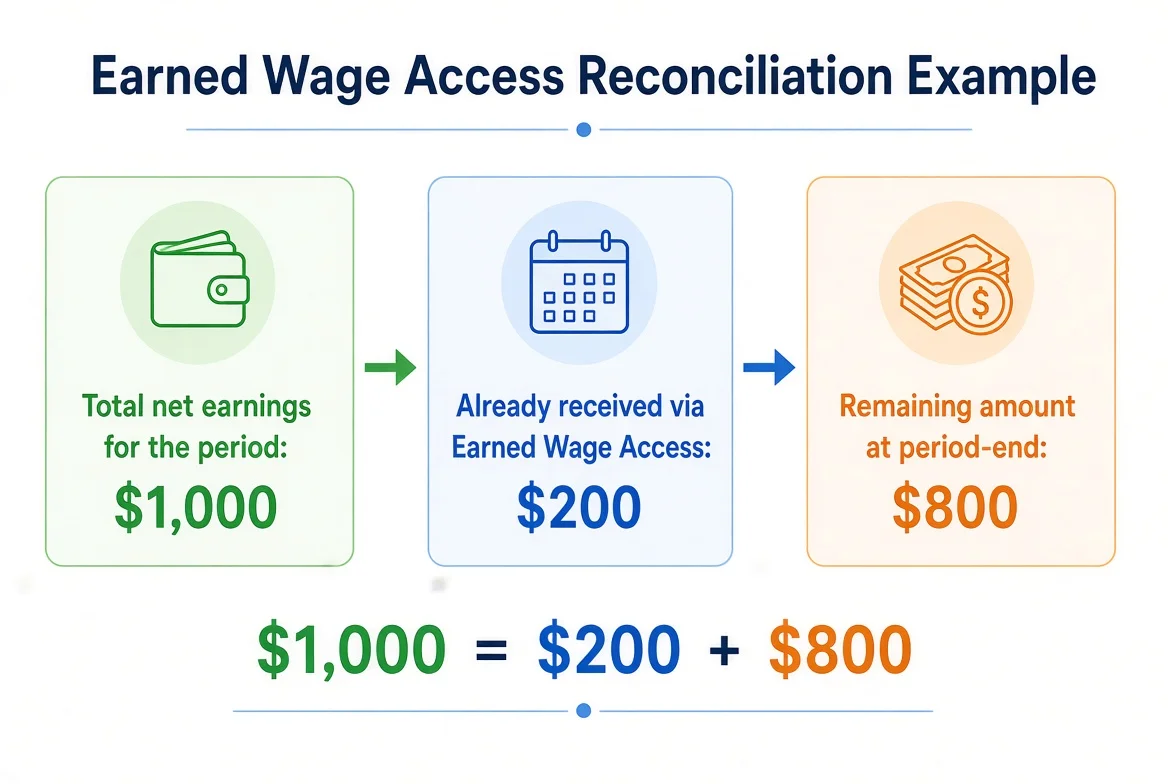
Simple example:
Total net earnings for the period after full calculation: 10,000,000 VND;
Already received via earned wage access: 2,000,000 VND;
If there are no other adjustments, the remaining amount transferred at period-end: 8,000,000 VND.
The employee has still received a total of 10,000,000 VND: 2 million earlier and 8 million on payday.
This example only illustrates the principle and does not represent an actual payslip.
Distinguishing four important figures
Figure | Meaning | Common mistake |
|---|---|---|
Total earnings / total wages for the period | Value formed based on workdays and payroll policy | Mistaking it for the final bank transfer amount |
Earned wage access already paid | Portion already received during the period | Thinking this is a fee or that the money is lost |
Other deductions / adjustments | Items processed in payroll according to applicable rules | Grouping everything under “earned wage access” |
Net remaining amount payable | Amount still transferred after reconciliation | Comparing it to total wages while ignoring the advance already received |
A transparent payslip should separate these groups instead of showing only a single final figure.
The chain from workday to payslipf
Not every request created is immediately deducted. In principle, only amounts with a validly disbursed status should be counted as money the employee has already received.
Basic reconciliation formula
At the simplest level:
> Remaining amount payable at period-end = Total net earnings for the period − Total earned wage access already disbursed in the period
In practice, “total net earnings for the period” already reflects all wage components, allowances, bonuses, social insurance, tax, deductions, or adjustments according to applicable policy and law. Therefore you should not use the formula above to calculate total wages yourself if you do not have complete payroll data.
The key point to check is whether the earned wage access amount is deducted exactly once, for the correct disbursed amount, in the correct period, and for the correct person.
Illustrative payslip example
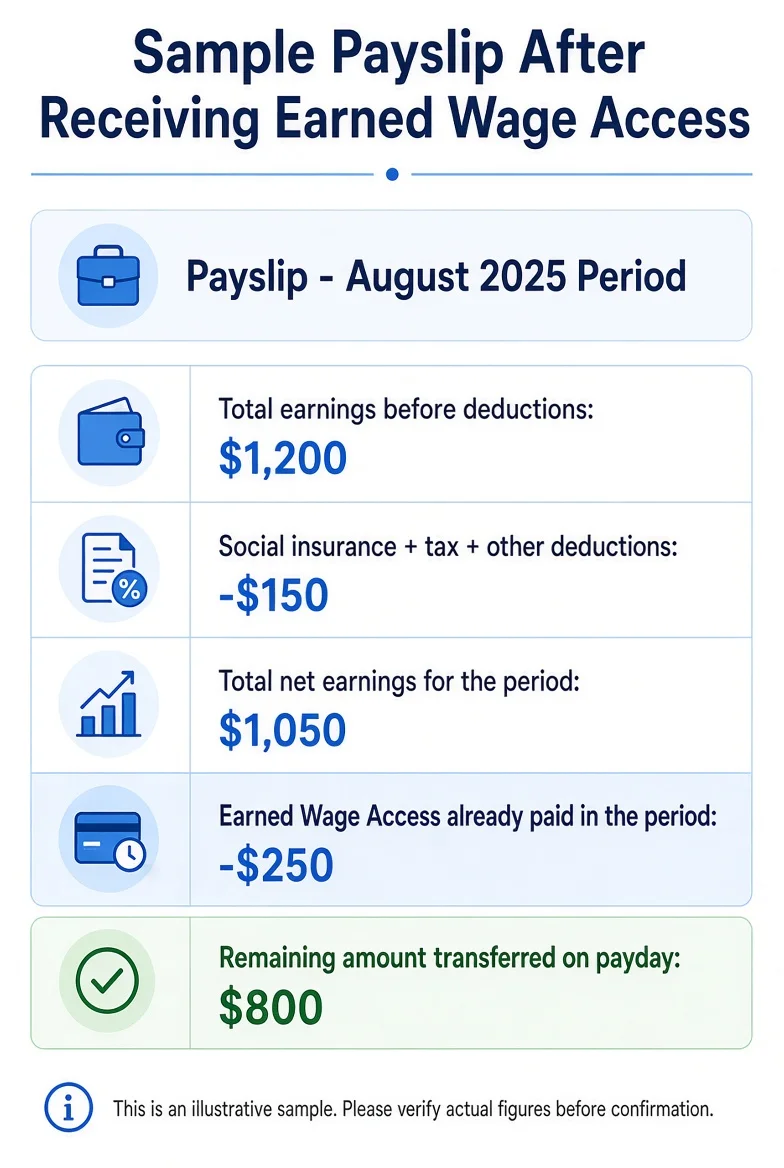
Suppose the payslip shows the following information:
Item | Illustrative amount |
|---|---|
Total earnings before deductions | 12,000,000 VND |
Social insurance, tax and other deductions | 1,500,000 VND |
Total net earnings for the period before earned wage access | 10,500,000 VND |
Earned wage access already disbursed in the period | 2,500,000 VND |
Remaining amount transferred on payday | 8,000,000 VND |
The employee has received a total of 10,500,000 VND: 2.5 million during the period and 8 million at period-end. The 2.5 million is not an extra cost if the current policy does not charge the employee any fee.
Checking the payslip in 8 steps
Step 1: Verify the correct person and correct period
Check full name, employee ID, client, pay month/period, and date range. If you look at the wrong period, every subsequent comparison will be wrong.
Employees who work for multiple clients should check whether the payslip is consolidated or split by workplace.
Step 2: Check workdays
Compare workdays on the payslip with:
Timekeeping history;
Approved workdays;
Shifts worked;
Leave days, overtime, or any adjustments;
Workdays at each client.
Do not simply count the number of lines. Night shifts, hourly work, and client-specific rules may be converted differently.
Step 3: Check unit rates and earnings components
The available amount in earned wage access uses the daily rate configured by Nhan Kiet for each client. The final payslip may contain many additional components.
Employees should distinguish:
Wages based on workdays;
Allowances;
Overtime;
Bonuses;
Prior-period adjustments;
Other items according to policy.
Do not expect the figure shown on the earned wage access screen to equal the full total earnings on the payslip.
Step 4: Obtain the list of earned wage access transactions
Record every transaction in the period:
Date | Transaction code | Request amount | Status | Actual amount received |
|---|---|---|---|---|
… | … | … | Disbursed / pending / failed | … |
Only add up amounts that have been confirmed as disbursed and actually credited to the account. Failed or unclear transactions must be investigated; do not include or exclude them based on assumption.
Step 5: Sum the total amount received in the correct period
Transaction dates and the pay period may not always align with the calendar month. Use the period rules of Nhan Kiet / the client.
For example, a transaction on the last day of the month may belong to the period being closed or the next period, depending on the data lock time. This is a point Nhan Kiet must publish clearly.
Step 6: Check the earned wage access deduction line
Compare the total on the payslip with the total of disbursed transactions. The line should have a clear name such as “Wages already received in advance during the period”, avoiding wording that makes employees think it is a fee or a loan.
Step 7: Check the amount transferred at period-end
Compare the remaining net pay on the payslip with the bank transaction on payday. Do not rely only on SMS; open the full account history.
Step 8: Add up everything actually received
> Total received in the period = Total earned wage access credited to the account + Final salary amount credited to the account
Compare this figure with the “total net earnings” after legitimate deductions on the payslip.
How does the reserve amount appear at period-end?
(Details: see What is the reserve amount in earned wage access?.)
The reserve amount is the portion of wages not yet opened for early access; it is not a fee. When final settlement occurs, the corresponding valid workdays still need to be processed in payroll.
Employees should not simply add “available amount” + “reserve” and assume that is total wages, because the payslip contains many other components. However, the system should allow tracing how the reserved portion was released into the payroll process.
If the payslip does not display the reserve separately, the application should explain that the reserve exists only at the early-access stage and is released into the payroll workflow.
Are the workdays used to receive money lost?
No. The system marks advancecovereddays to know which workdays formed the basis for the advance and to prevent them from being counted again in a later period. This is a double-counting prevention mechanism, not deletion of workdays.
A transparent screen should show:
Workdays still exist;
Which days contributed to the amount already received;
The amount already disbursed from those days;
The remaining portion processed in payroll;
Settlement status.
Why can the requested amount differ from the amount deducted?
(If a transaction result is still unclear: see Withdrew earned wage access but money has not arrived.)
In normal situations, the total earned wage access deduction must match the total of validly disbursed amounts. If they differ, possible causes include:
A transaction is still pending / unclear;
A failed transaction was incorrectly counted;
A disbursed transaction belongs to a different period;
A transaction was refunded or adjusted;
The employee added up the requested amount instead of the actual disbursed amount;
Duplicate codes or missing transactions in the report;
Wrong person, wrong client, or wrong period;
Reconciliation data has not been finalized.
Do not try to correct it yourself with another offsetting transaction. Trace by reference code.
How does bank reconciliation work?
According to the system:
Unclear-status amounts are checked periodically about every 5 minutes;
T+1 reconciliation reads VPBank data at 08:00 every day;
Unclear statuses are kept pending rather than guessed;
Finalizing reconciliation requires superadmin confirmation because it involves money.
These milestones describe the technical schedule; they are not an SLA promising that every discrepancy will be resolved within 5 minutes or by 08:00 the next day.
12 common discrepancies when reading the payslip
1. Comparing the period-end amount with total wages
The employee forgets to add the portion already received earlier.
2. Including failed transactions in the amount already received
Only count amounts that were actually disbursed.
3. Missing a small transaction
Multiple requests in a period are easy to overlook when adding manually.
4. Comparing the wrong pay period
A transaction near the data-lock point may belong to a different period.
5. Mistaking the reserve for a deduction
The reserve is the portion not yet opened for early access; it is not a fee.
6. Mistaking a fee for money already received
The current flow does not charge interest or fees to employees; the earned wage access line is the portion already paid in advance.
7. Workdays were corrected but not re-approved
Correcting hours/shifts returns the record to pending approval and may change the calculation result.
8. One person works for multiple clients
Unit rates, workdays, and reserves may be split by workplace.
9. Night shift assigned to the wrong calendar day
Comparing calendar dates while ignoring business dates can create discrepancies.
10. Amount already received deducted twice
This is a serious error that must be traced by each transaction code and payroll line.
11. Money has arrived in the bank but the app has not updated
Status and settlement data may update at different times; use the bank statement for comparison.
12. Other adjustments unrelated to earned wage access
Do not attribute every reduction on the payslip to earned wage access. Check each line and its basis.
Process for handling a mismatched payslip
Identify the type of discrepancy
Wrong workdays: supervisor / client;
Wrong profile or client: Nhan Kiet HR;
Wrong transaction / disbursement status: payments team;
Wrong wage components: payroll / salary accounting;
Wrong bank account: support and VPBank according to responsibility scope.
Submit structured data
Instead of messaging “my salary is short”, record:
Pay period;
Workdays on the payslip and workdays you reconciled;
Total net earnings according to the payslip;
List of disbursed transaction codes;
Total earned wage access credited to the account;
Period-end salary amount credited to the account;
Specific discrepancy;
Line you believe is incorrect.
Sample request for payslip reconciliation
> I need support reconciling the payslip for period … . Full name: …; employee ID / timekeeping ID: …; client: …; approved workdays: …; total net earnings on the payslip: …; total earned wage access disbursed under codes … is …; period-end salary amount already credited to the account: …; discrepancy I calculated: …; line that needs checking: … . Please have the responsible team reconcile workdays, transactions, and payroll.
Do not send OTP, passwords, or the entire bank statement. Provide only the relevant transactions through official channels.
What should employees keep?
Payslips for each period;
History of approved workdays;
Earned wage access transaction codes;
Time, amount, and status;
Receipt history in VPBank;
Investigation responses;
Adjustment decisions if any.
There is no need to screenshot every day if the system allows downloading history; however, keep evidence when there is a discrepancy or an unclear transaction.
What should a payslip display to be easy to understand?
Group | Content that should be present |
|---|---|
Identification | Employee, client, pay period |
Workdays | Date / hours / shift and final status |
Earnings | Wages, allowances, overtime, bonuses, adjustments |
Deductions | Each item and its basis / explanation |
Earned wage access | Total already disbursed, number of transactions, link to view details |
Payment | Total net earnings, already paid in advance, remaining amount at period-end |
Support | Button to create a request with period and data pre-filled |
Suggested line name: “Wages already received in advance during the period via earned wage access”. This wording is clearer than “salary advance deduction” if employees easily misunderstand it as a cost.
Conclusion
To read a payslip correctly after using earned wage access, add both the portion already received during the period and the portion paid at period-end. The earned wage access line is not a penalty or a fee; it is the portion of wages already paid in advance, provided the current policy still does not charge employees any fee as in the present flow.
Employees should verify the correct person, correct period, workdays, earnings, disbursed transactions, and the actual amount received in the bank. Nhan Kiet needs to design payslips that allow tracing from a single total line back to each transaction code and the corresponding workdays. When every figure can be explained and reconciled, trust in earned wage access will be significantly higher.
References
---
Author: Nguyen Minh Tuan — Strategy Team Specialist, Nhan Kiet Manpower Supply Co., Ltd.
Consultation for businesses: Hotline 0937.022.655 · Email info@nhankiet.vn · Earned Wage Access for businesses
FAQ
Does receiving earned wage access reduce total wages?
Not by itself if the policy does not charge a fee. It reduces the amount transferred at period-end because part of the wages has already been paid in advance.
Is the earned wage access line on the payslip a fee?
No. The current flow does not charge interest or fees to employees. This line should represent money already received in advance.
Why did I receive 2 million but 2 million was deducted at month-end?
Because the 2 million already entered your account earlier; it is deducted from the remaining balance to avoid receiving it twice.
Is the reserve amount deducted again on the payslip?
The reserve is not money that has been disbursed. The corresponding valid workdays still need to be processed in settlement; the exact display method needs confirmation from Nhan Kiet.
Can a failed transaction be deducted from salary?
In principle it should not. Check the status and bank evidence if the payslip is currently counting a failed transaction.
Is a pending transaction counted?
It should not be finalized until there is a final result. The system keeps it pending to avoid incorrect recording and double payment.
Are the workdays used for the advance deleted?
No. Workdays are marked as having been used to calculate the advance in order to prevent double-counting, but they must still exist in the history and settlement.
If I work for two clients, how should I read the payslip?
Check workdays, unit rates, amounts already received, and reserves by each client before looking at the consolidated view.